Mod
Anaglyph Look
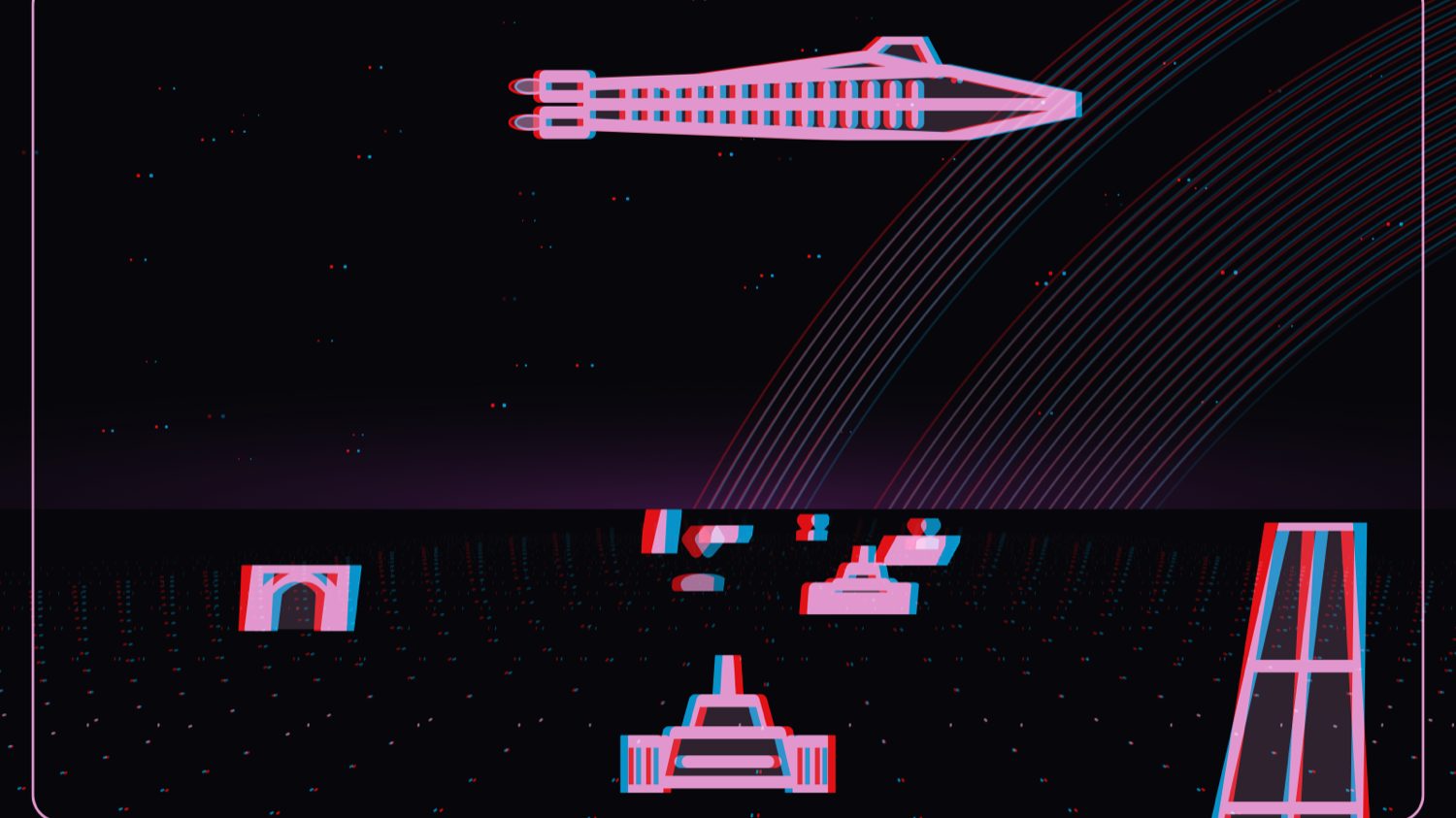
A dark theme with a 3D scene behind the chat for red-cyan glasses: an arena of tanks and beacons that follows what Claude is doing, or a grid with floating shapes, and a calibration step that tunes the colors to your glasses.
Copies this README as markdown, to paste into Claude.
Install#
In Claude Code, add the tinwright marketplace once, then install the plugin:
/plugin marketplace add tinwright/ai-apprentice
/plugin install anaglyph-look@tinwright
Claude Code asks for the settings below when you enable it. Change them later in /config.
It's for the Claude desktop and mobile apps: the terminal has no backdrop to draw in, so there it does nothing.
How to use it#
Put on red-cyan glasses, red lens on the left eye, and type /anaglyph-calibrate first.
/anaglyph-calibrateopens a test card: the words LEFT and RIGHT printed over each other. Close one eye at a time: each lens should show only its own word. Dim whichever color still shows through the other lens, keep the two about as bright as each other, and press Save. The scene behind the chat changes as you go, and your colors are kept for every session.- The arena sits behind the chat, seen from just behind your own tank as you follow another. It follows Claude: parked while nothing happens, the dotted ground streaming toward you and the world turning while Claude works, bolts flying at the tank ahead when a tool runs, beacons lighting up when Claude is waiting for you, and the tank ahead blowing up when Claude finishes work that used a tool.
- The sky has a planet's ring arcing up from the horizon, far behind everything, and a long carrier cruising across in front of it.
- The readout above the prompt says what your tank is doing, how full Claude's context window is, and the shots and hits this session.
/anaglyph-demoplays every arena state in about 25 seconds, with the status line saying what each one means.
Without glasses it still reads as an old 3D movie poster. The words stay flat and readable: red and cyan never color the chat's text.
Settings#
| Setting | Default | What it does |
|---|---|---|
| Scene | arena | arena follows what Claude is doing; grid is a floor rolling toward you with wireframe shapes floating in and out of the screen. |
| Depth | 1 | How far the scene reaches behind and in front of the screen, from 0.2 to 2. |
| Glasses | typical | The colors to start from until you calibrate: clean, typical or leaky. |
- Lines stay doubled? Lower the depth, in
/anaglyph-calibrateor here. - A faint second outline through one lens? That's ghosting: the lens lets some of the other color through. Dim that color in
/anaglyph-calibrate. Cardboard glasses usually need much darker colors than glass or acrylic ones. - A saved calibration wins over the Glasses and Depth settings. Back to settings in the calibration pane clears it.
Good to know#
- A session has one look at a time, so this replaces other theme mods such as Skywatch or Vim Look. Turn the other one off to see this one.
- Everything moves with CSS animation, and holds still if your system asks for reduced motion.
- The arena's tanks, pylons and beacons are this plugin's own, in the spirit of early-'90s wireframe tank games.
Feedback#
Found a bug or have an idea? Open an issue.